
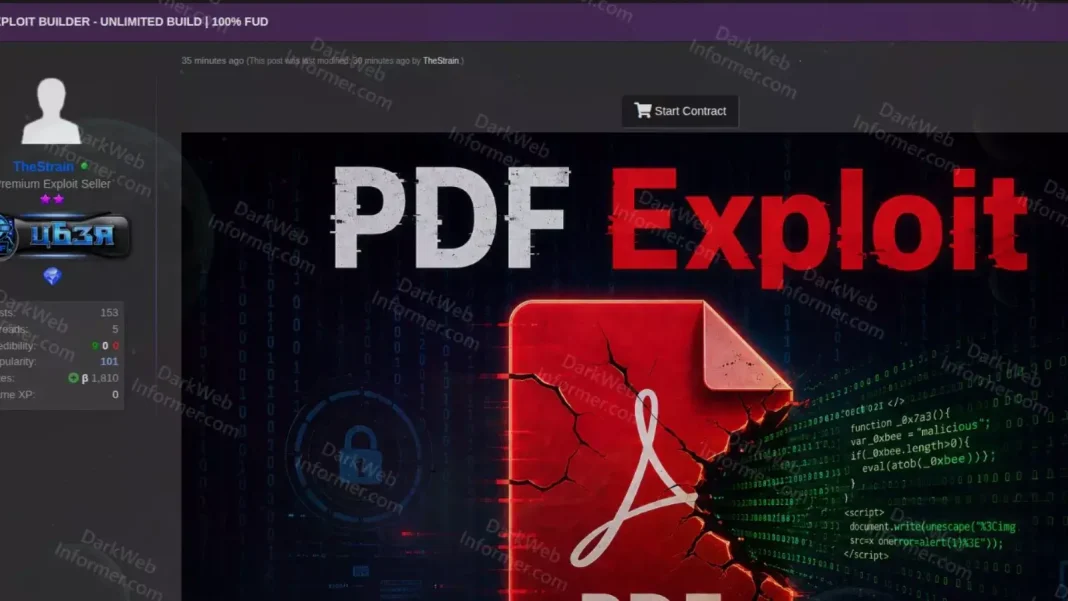
PDF Exploit Builder Discussions: The Real Risk Is When Trusted File Types Become Attack Surfaces
Executive Summary
PDF files remain one of the most widely used document formats in enterprise environments. Proposals, invoices, contracts, HR documents, audit reports, technical documentation, and official correspondence are frequently exchanged as PDFs.
This operational trust makes PDF an attractive delivery mechanism for attackers.
Recent discussions around alleged PDF exploit builder activity highlight a broader security concern: organizations should not assess document risk only by file extension or reputation. The more relevant question is what happens after the file is opened.
A PDF can act as a phishing container, a payload delivery mechanism, a redirection layer, a social engineering asset, or an exploit trigger. For this reason, PDF security should be treated as part of endpoint hardening, email security, threat detection, and operational visibility.
Introduction
PDF is often perceived as a safe and routine document format. In most corporate environments, employees open PDF files daily without hesitation. This is understandable, because PDF is deeply embedded into business workflows.
However, attackers tend to exploit what users and organizations already trust.
A PDF file does not need to look suspicious to be dangerous. It may contain a phishing link, redirect the user to a fake authentication page, embed another file, trigger active content, or attempt to exploit a vulnerable PDF reader application.
The recent discussion around PDF exploit builders is important not because of one specific actor or one specific tool, but because it reminds organizations of a broader reality: trusted file types can become effective attack surfaces when they are not properly monitored, restricted, and analyzed.
Why PDF Remains an Effective Attack Vector
PDF is valuable to attackers because it blends naturally into corporate communication.
Finance teams receive invoices as PDFs. Procurement teams receive proposals as PDFs. HR teams review CVs and employee documents in PDF format. Legal and administrative teams exchange contracts and official documents as PDFs. Technical teams receive reports, diagrams, and documentation in the same format.
This creates a familiar pattern for users.
When a PDF arrives, many users think of it as a document, not as a potential execution path.
That perception is exactly what attackers abuse.
A successful attack does not always require a highly sophisticated exploit chain. In many cases, a convincing email, a relevant business context, and a trusted file format are enough to move the user into the next stage of the attack.
PDF can serve several roles in an attack chain:
It can redirect the user to a phishing page.
It can contain a malicious or suspicious link.
It can include QR-based phishing content.
It can embed another file.
It can trigger active content.
It can act as the first stage of a payload delivery chain.
It can attempt to exploit a vulnerable reader application.
From a defensive perspective, PDF files should not be treated merely as attachments. They should be treated as potential entry points into a broader attack chain.
Malicious PDF and PDF Exploit Are Not the Same Thing
This distinction is important for enterprise security teams.
Not every malicious PDF contains an exploit.
Some malicious PDFs are designed for phishing. They may redirect users to fake Microsoft 365 login pages, fake file-sharing portals, fake payment verification screens, fake CAPTCHA pages, or credential harvesting infrastructure. In this model, the attacker is not necessarily exploiting a technical vulnerability in the PDF reader. The attacker is exploiting trust.
Other PDFs may contain embedded files or external links that are used to initiate the next stage of the attack. In this scenario, the PDF may not directly execute malware. Instead, it acts as a delivery or staging mechanism.
A true PDF exploit scenario is different. In that case, the attacker attempts to trigger a vulnerability in the PDF reader application when the file is opened. The vulnerability may exist in the parser, JavaScript engine, font rendering component, image processing logic, memory handling, sandbox boundary, or permission model.
If successful, the exploit may enable code execution, system reconnaissance, additional payload delivery, or further activity under the context of the affected user.
Therefore, the key question should not be limited to:
Is this PDF malicious?
A stronger question is:
What happened on the endpoint after this PDF was opened?
How a PDF Exploit Builder Scenario Could Work
A PDF exploit builder or PDF-based attack generation tool can be understood as a mechanism that enables attackers to produce similar attack chains for different targets more quickly.
At a high level, such an attack flow may involve four main layers.
1. Delivery Layer
The attacker delivers the PDF to the target user.
This may happen through an email attachment, a file-sharing link, a fake invoice, a proposal document, a CV, a shipment notification, a payment request, a tender document, or a document designed to resemble official correspondence.
The objective at this stage is simple: get the user to open the file.
2. Trigger Layer
Once the PDF is opened, the first step of the attack chain begins.
There are generally two possible paths.
The first path is social engineering. The user may be encouraged to click a link, scan a QR code, open an embedded file, bypass a warning, or complete a fake verification step.
The second path is exploitation. The PDF may attempt to trigger a vulnerability in the reader application automatically when the file is opened.
3. Execution Layer
At this stage, the attacker attempts to achieve code execution, deliver a second-stage payload, or redirect the user into a malicious workflow.
Unexpected child process creation from a PDF reader, outbound connections to unknown domains, file creation in temporary directories, or script interpreter activity are important signals at this stage.
4. Impact Layer
If the attack succeeds, the next steps may include system discovery, credential theft, loader execution, command-and-control communication, persistence, or preparation for lateral movement.
This is why PDF-based threats should not be investigated only through static file analysis. The behavior that follows file opening often provides stronger and more reliable detection signals.
What “FUD” Means in This Context
In underground terminology, “FUD” stands for “Fully Undetectable”. Attackers use this phrase to claim that a file is not detected by antivirus products, EDR solutions, sandboxes, or email security gateways.
From an enterprise security perspective, this term should be interpreted carefully.
FUD is not a permanent state. It is usually a temporary detection gap.
A file that is not detected today may be detected tomorrow through signature updates, behavioral analytics, reputation changes, sandbox intelligence, or threat intelligence enrichment.
In PDF-based attacks, detection evasion may rely on several techniques:
Generating different PDF structures for each campaign or victim.
Changing metadata, object streams, compression methods, or embedded sections.
Obfuscating JavaScript, URLs, embedded objects, or payload references.
Using the PDF only as a first-stage document while hosting the real payload externally.
Detecting sandbox environments and delaying or suppressing malicious behavior.
Using redirect chains to hide the final phishing or payload destination.
The goal of these techniques is not always to create a highly advanced exploit. In many cases, the goal is to avoid simple hash-based detection, static signatures, and basic sandbox workflows.
Where the Enterprise Risk Begins
The risk begins when PDF is treated as a low-risk document type by default.
Many organizations apply stricter controls to executable files, Office macros, and archive files. PDF files, however, are often allowed because they are considered part of normal business communication.
That assumption creates exposure.
In modern attack chains, PDF may act as:
A phishing redirection mechanism.
A credential harvesting entry point.
A QR phishing carrier.
An embedded payload container.
An exploit trigger.
A social engineering wrapper.
A staging point for second-stage payload delivery.
For this reason, security controls should focus not only on the file itself, but also on the behavior that follows.
Security teams should ask:
Did the PDF reader launch a child process?
Did the endpoint connect to an unknown or rare domain after the PDF was opened?
Was a file created under Temp, AppData, or another user-writable directory?
Was PowerShell, cmd, wscript, mshta, rundll32, regsvr32, java, curl, or bitsadmin executed?
Was there any sign of credential access, persistence, or payload staging shortly after the document was opened?
These questions shift the investigation from file reputation to behavioral context.
That is where stronger detection begins.
Protection Strategy: Patch, Policy, and Telemetry
Effective protection against PDF-based threats cannot depend on a single security control. Organizations need a layered approach that combines patch management, endpoint hardening, email security, behavioral detection, and operational visibility.
1. Include PDF Readers in Centralized Asset Inventory
Adobe Acrobat Reader, Foxit Reader, and other PDF reader applications should be included in centralized asset and vulnerability management processes.
Organizations should know which PDF reader versions are installed across endpoints. Relying only on the assumption that automatic updates are enabled is not enough.
Version visibility should be validated through endpoint management, vulnerability management, or asset inventory tools.
2. Prioritize Security Updates for PDF Readers
PDF reader vulnerabilities can create client-side exploitation risks, especially when exploitation requires only user interaction such as opening a document.
Security updates for PDF readers should be prioritized based on risk level. Vulnerabilities known to be exploited in the wild should not wait for standard monthly patch cycles where business impact allows faster remediation.
For high-risk vulnerabilities, patch SLAs should be measured in hours or days, not weeks.
3. Control Child Process Creation from PDF Readers
A PDF reader launching suspicious child processes is rarely normal business behavior.
Security teams should closely monitor or block PDF reader processes spawning tools such as:
cmd.exe
powershell.exe
wscript.exe
cscript.exe
mshta.exe
rundll32.exe
regsvr32.exe
java.exe
curl.exe
bitsadmin.exe
Controls such as Microsoft Defender Attack Surface Reduction rules can help reduce this attack surface, particularly by preventing Adobe Reader from creating child processes where operationally feasible.
Before enforcing blocking rules, organizations should test them in audit mode to identify legitimate business exceptions.
4. Restrict PDF JavaScript and Active Content
Organizations should evaluate whether PDF JavaScript is genuinely required in their environment.
In many enterprise scenarios, the business need for PDF JavaScript is limited, while the security risk can be significant.
Policies should be established for:
PDF JavaScript.
Embedded files.
Automatic actions.
External links.
Interactive forms.
Reader security warnings.
If active content is required for specific workflows, it should be restricted, documented, and monitored.
5. Perform Deep Analysis of PDF Attachments
Email security solutions should not evaluate PDF files only by extension, hash, or basic signature matching.
PDF inspection should include checks for:
Embedded JavaScript.
Embedded objects or files.
External URLs.
Redirect chains.
High-entropy streams.
Suspicious action definitions.
Unusual metadata.
Known phishing themes.
Unexpected object structures.
This analysis should be enriched with sandboxing, URL rewriting, reputation services, and threat intelligence.
6. Build Behavioral Correlation Use Cases
The strongest signals in PDF-based attacks often appear after the file is opened.
SOC teams should correlate events such as:
PDF reader opened.
Child process created shortly after.
Outbound connection initiated.
File written under Temp or AppData.
Unknown or newly observed domain contacted.
Suspicious script interpreter launched.
Credential access or persistence behavior detected.
Individually, these signals may not always be critical. Together, within the same user, endpoint, and time window, they can indicate a high-priority incident.
7. Update Security Awareness Training
Traditional awareness training often focuses on executable files, malicious links, and Office macros.
This is no longer sufficient.
Users should also be trained on PDF-based phishing, QR phishing, fake CAPTCHA pages, fake file-sharing workflows, embedded file warnings, and suspicious reader prompts.
The message should be practical: PDF is a business document format, but it is not automatically safe.
PRTG and Operational Visibility
PRTG and similar monitoring platforms are not malware analysis engines or PDF sandboxing solutions. However, they can provide strong operational visibility across the security ecosystem.
Organizations can use PRTG to monitor signals and services such as:
Mail gateway health.
Email security alert volumes.
DNS query anomalies.
Blocked domain counts.
Proxy traffic spikes.
Firewall, SIEM, or EDR syslog events.
Availability of critical security services.
Sandbox or mail security API status.
Security-related infrastructure performance.
This helps security, IT operations, and network teams understand where abnormal activity is increasing and which security components are generating critical signals.
In this context, PRTG should be positioned as an operational visibility and alerting layer, not as a replacement for EDR, SIEM, email security, or sandboxing technologies.
When integrated properly, it can help teams identify escalation points faster and maintain better visibility over the health and signal volume of security controls.
Enterprise Checklist
Organizations should consider the following actions:
Maintain a centralized inventory of PDF reader applications.
Validate installed versions across endpoints.
Apply security updates for Adobe Acrobat Reader, Foxit Reader, and other PDF readers promptly.
Monitor or block suspicious child process creation from PDF readers.
Restrict PDF JavaScript and embedded active content.
Inspect PDF attachments using deep content analysis.
Correlate email, endpoint, DNS, proxy, firewall, and SIEM telemetry.
Create SOC use cases for post-PDF-opening behavior.
Include PDF phishing and QR phishing in awareness training.
Monitor critical security services and alert volumes through platforms such as PRTG.
Include PDF-based attack scenarios in incident response playbooks.
Conclusion
The PDF exploit builder discussion points to a broader enterprise security issue: trusted file types can become effective attack surfaces when they are not properly controlled.
PDF files cannot realistically be removed from business workflows. They are too deeply embedded in daily operations.
However, they should not be excluded from security scrutiny.
Modern defense requires organizations to look beyond the file extension and focus on behavior.
What process did the PDF reader launch?
Which domain did the endpoint connect to?
Was a file downloaded or written to disk?
Was a script interpreter executed?
Did the activity lead to credential access, persistence, or payload staging?
Organizations that can answer these questions are better positioned to detect and contain PDF-based threats early.
The risk is not only inside the PDF file.
The risk begins when trusted document formats are allowed to operate without sufficient visibility, restriction, and behavioral monitoring.